Table of content

This Octal to Decimal Converter turns any valid base-8 number into its base-10 (decimal) value in seconds. Enter your octal number, hit convert, and copy the result. Optional steps show exactly how each digit contributes to the final decimal number.
Drop your octal value into the input box, then convert it into a base-10 number in a couple of clicks. If you’re double-checking work or learning the pattern, switch on the steps to see exactly how each digit contributes to the final result.
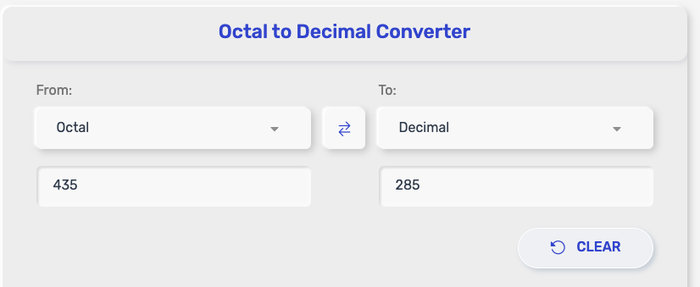
Most of the time, you’ll be converting a plain octal whole number into a decimal whole number. This tool is built for that core use case, and it can also handle a few extra formats depending on the settings your site enables.
Octal integers → decimal integers
Enter an octal whole number like 755 or 17, and the converter returns the exact base-10 equivalent with no rounding.
Large octal values → decimal output
Paste longer octal strings (for example, values used in technical configs). The converter will still produce a decimal result, as long as the input stays within any size limit you set. If your tool caps input length, it’s good to display a short note like “Max X digits” right under the input so users know what to expect.
Negative octal values → negative decimal results (optional)
If negative numbers are allowed, a leading minus sign works: -17 becomes -15 in decimal. If your tool doesn’t support negatives, it can simply reject the - and prompt the user to remove it.
Octal with a fractional part → decimal with rounding (optional)
If fractional input is supported, you can convert values like 17.4 (octal) into a decimal number with a fractional part. Since decimals can run long, the tool should apply rounding based on your chosen precision (for example, a fixed number of decimal places).
After you click Convert, the number you see in the result box is the decimal (base-10) version of your octal (base-8) input. In other words, it’s the same value written using the digits and place-value system we use in everyday math.
If your input is a whole number, the decimal output is exact. If your input includes a fractional part (like 17.4 in octal) and your converter supports fractions, the tool converts both sides of the decimal point and may round the final answer based on the precision setting (for example, a fixed number of decimal places).
When Show steps is turned on, the converter also displays how the result is built:
Each octal digit is matched with a power of 8 based on its position.
The tool multiplies every digit by its place value.
Then it adds those pieces together to produce the final decimal number.
This step view is especially handy for catching mistakes like a misplaced digit or an invalid octal character.
Here are a few common conversions you can scan fast before you run your own input.
|
Octal (base-8) |
Decimal (base-10) |
|
0₈ |
0₁₀ |
|
7₈ |
7₁₀ |
|
10₈ |
8₁₀ |
|
17₈ |
15₁₀ |
|
20₈ |
16₁₀ |
|
77₈ |
63₁₀ |
|
100₈ |
64₁₀ |
|
755₈ |
493₁₀ |
If you want to keep the page clean, you can place extra rows inside a Show more examples toggle (for example: 11₈ → 9₁₀, 12₈ → 10₁₀, 101₈ → 65₁₀, 777₈ → 511₁₀).
Even small formatting issues can make an octal value invalid. If your converter shows an error or returns a result that looks off, check these quick fixes first.
You used digits 8 or 9
Octal only allows 0–7. If your input contains 8 or 9, replace them with valid octal digits or re-check the original number.
You pasted spaces, commas, or extra symbols
Inputs like 7 55, 7,55, or 755; can fail validation. Remove separators and paste a clean number such as 755.
You included an octal prefix like 0o or a leading 0 format from code
Some languages display octal as 0o755 (or sometimes with a leading zero). If your tool supports prefixes, it can accept them. If not, delete the prefix and enter 755.
You entered a negative sign but negatives aren’t enabled
If the tool doesn’t allow negatives, -17 will trigger an error. Either enable “Allow negative numbers” (if available) or remove the minus sign.
You entered a fractional octal but fractions aren’t supported
Values like 12.3 (octal) require fractional conversion. If your tool only supports integers, remove the decimal point and convert the whole number, or use a version that supports fractions.
You used the wrong decimal point character
Some locales use a comma as a decimal separator (example: 17,4). If your tool expects a dot, switch it to 17.4.
The result looks “too big” or “too small”
This usually happens when the input is treated as decimal instead of octal (or vice versa). Make sure the input contains only 0–7, and double-check any copied value from a source that labels bases differently.
The number is extremely long
Very large inputs can exceed your tool’s maximum length or safe integer handling. If there’s a character limit, shorten the input. If you support big integers, display a note like “Large numbers may be shown without commas” or “Exact output requires big-number mode.”
A good UX touch: show the error message right under the input (for example, “Invalid octal digit: 9”), so users can fix it in one glance.
Octal (base-8) converts to decimal (base-10) by adding each digit multiplied by its power of 8:
Base rule: decimal = Σ(dᵢ×8ᶦ)
Place values move right to left: 8⁰, 8¹, 8², 8³, ...
If your tool supports fractional octal (digits after a dot), the places use negative powers:
Fraction places: 8⁻¹, 8⁻², 8⁻³, ...
The decimal result may be rounded to match your selected precision (for example, a fixed number of decimal places).
Octal numbers pop up in a few places outside of pure math exercises. Here are common situations where an octal-to-decimal conversion saves time.
Homework checks and practice
Convert octal answers into decimal to verify calculations, compare results with classmates, or confirm you didn’t mix bases.
Reading file permissions and system settings
In many Unix/Linux contexts, values like 755 or 644 appear in documentation and commands. Converting to decimal can make it easier to run extra calculations or sanity-check what a value represents.
Learning positional notation (base systems)
Octal is a clean stepping stone between binary and decimal because each octal digit maps neatly to three binary bits. Converting to decimal gives you a quick reality check that your place values are lined up correctly.
Debugging and cross-checking technical values
If you see an octal value in a configuration, log, or example snippet, converting it to decimal can make it easier to compare against other numeric outputs that default to base-10.
Quick conversions during study sessions
When you’re doing lots of problems, a converter is faster than manual expansion—especially for longer octal numbers—while the “Show steps” view still lets you see the logic when you need it.
Knuth, D. E. (1997) – The Art of Computer Programming, Volume 2: Seminumerical Algorithms (3rd ed.)
https://www-cs-faculty.stanford.edu/~knuth/taocp.html
IEEE (2019) – IEEE Standard for Floating-Point Arithmetic (IEEE 754-2019)
https://standards.ieee.org/standard/754-2019.html
Wolfram MathWorld – Octal (Base-8) Numeral System
https://mathworld.wolfram.com/Octal.html
Encyclopaedia Britannica – Positional Numeral System
https://www.britannica.com/science/positional-numeral-system
Wikipedia – Octal
https://en.wikipedia.org/wiki/Octal
Only 0–7. If 8 or 9 appears, the converter should flag it as invalid.
Yes, if the tool allows a leading -. The output stays negative in decimal.
If fractional input is enabled, it converts the fractional part and applies rounding based on the decimal places setting.
Because 10₈ means one “eight” and zero “ones”, so it equals 8₁₀.
A digit-by-digit breakdown of place values and the sum that forms the final result.
For integers, yes. For fractional inputs, the result may be rounded depending on your settings.
If you support it, the tool can accept that prefix. If not, remove 0o and enter 755.
Depends on your tool limits. If you cap length, state the max characters and what the tool does when exceeded.
Octaltodecimal.com is a simple and efficient online tool designed to help users quickly convert octal numbers to decimal values with accuracy and ease. Our goal is to make number system conversions accessible for students, programmers, engineers, and anyone working with digital or computer-based calculations.
This tool is built to be fast, straightforward, and easy to use—no downloads, no complicated steps, and no account registration required. Simply enter an octal value and instantly get the decimal result.
Octaltodecimal.com was created through the efforts of a small team of developers and contributors who are passionate about building practical online utilities that simplify everyday calculations and technical tasks.
We are committed to providing reliable, user-friendly tools that help make learning and working with number systems more convenient.
We aim to provide simple, reliable, and accessible tools for everyday calculations and conversions while maintaining transparency with our users.
binarytooctal.com does not collect or store personal information. Any numbers entered into the converter are used only to perform the calculation and are not saved or shared.
This tool is designed to provide accurate base-conversion results using standard mathematical methods. However, results are intended for informational and educational purposes, and users should verify outputs when using them in critical applications.
By using this tool, you agree to use it responsibly. The creators and contributors are not liable for any decisions, code implementations, or outcomes that rely solely on the results generated by this converter.
We may update this policy from time to time to reflect improvements to the tool or changes in our practices. Any updates will be posted on this page to maintain transparency.